Trailers, assets and reefer temperatures
Know which truck has which trailer, where it is, and whether the reefer is holding temperature.
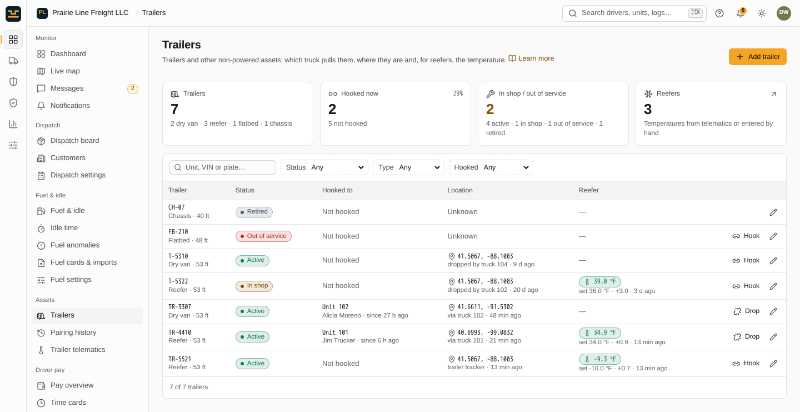
What you get
Trailer register
Dry vans, reefers, flatbeds, tankers, chassis and containers, with their documents.
Hook and drop
Drivers hook and drop trailers in the app (or the office does it in the portal), building a full pairing history.
Location from the truck
A hooked trailer’s location comes from the truck pulling it.
Reefer readings
Return air, discharge air and setpoint, entered or imported by CSV, with a temperature-out-of-range alert.
In the driver app
My trailer in the driver app
The driver app shows drivers what they need for this, in English or Español, and keeps working offline.
Tour the driver app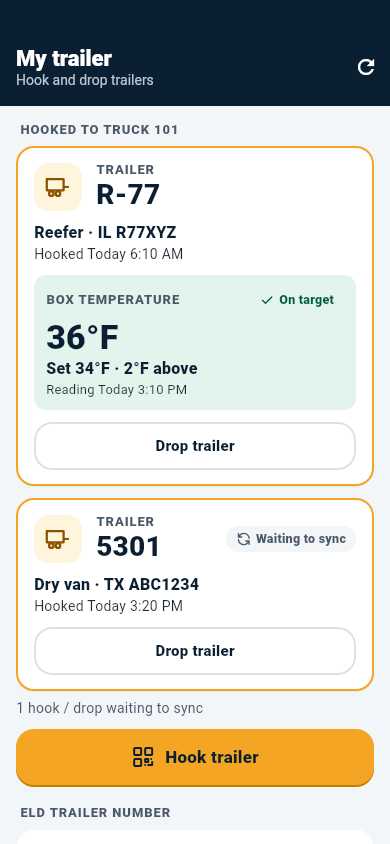
Learn more in the help centre
Related features
Built to the FMCSA ELD technical specification (49 CFR Part 395, Subpart B, Appendix A). FMCSA registration is in progress.
Run your fleet from one place
Start a 14-day free trial. No credit card, no long setup: add your trucks and drivers and you are ready to roll.